Segment Anything Model (SAM) produces high-quality object masks from point or box prompts and can generate masks for every object in an image. This repository provides inference code, three pretrained backbone variants, example notebooks, automatic-mask generation, ONNX export, and a React/WebAssembly browser demonstration.
EVIDENCE-GROUNDED REPOSITORY INTELLIGENCEFrom a research repository to
From a research repository to
auditable, reproducible understanding
RepoLens gives researchers and R&D teams a source map, key mechanisms, a reproduction path, and an evidence index. Models connect concepts; repository evidence constrains facts.
MEASURED, NOT CLAIMED
Retrieval quality measured on real research repositories
The fixed benchmark compares README-only retrieval with RepoLens evidence-aware retrieval on the same public Python AI repositories. The metric is exact-path recall against human-labeled key files; it is not semantic accuracy or reproduction success.
35.1% → 73.8%Mean Python key-file recall
+38.7 ppDeterministic retrieval gain
0.0%Invalid evidence ID rate
0 calls · 0 tokensModel usage in this retrieval test
RepositoryREADME-onlyRepoLensDifference
karpathy/nanoGPT60.0%100.0%+40.0 pp
openai/whisper28.6%71.4%+42.8 pp
facebookresearch/segment-anything16.7%50.0%+33.3 pp
Multi-project repositories were tested separately: the fixed `lora` and `mnist` scopes both reached 100% exact-path recall. Scoped reports should not be compared directly with whole-repository results.
RESEARCH BRIEF
facebookresearch/segment-anything
Promptable image segmentation with source-grounded inference, automatic-mask, and ONNX deployment paths.
Source-grounded AI analysisOpen repository ↗
DeepSeek analysis validated against immutable repository evidence.
Model usage · 1 calls · 8,334 input tokens · 2,872 output tokens
Primary languageJupyter Notebook
Stars54.8k
Files analyzed59
Evidence files10
Review time110 min
Claim confidenceModerate evidence
Analysis revisiondca509fe
The README establishes supported inputs and model checkpoints. SamPredictor prepares and caches image embeddings before repeated prompt prediction, ResizeLongestSide normalizes images and coordinates, and the ONNX notebook defines the deployment input contract.
Trace the SamPredictor input-to-mask path first, then validate the ONNX export contract against the notebook and browser-demo documentation before changing model internals.
MECHANISM MAP
Key mechanisms, not a generic summary
PythonPyTorchJupyterONNXReactWebAssembly
01
FoundationPromptable segmentation
SAM turns point or box prompts into object masks and can also generate masks for every object in an image, supporting zero-shot use across segmentation tasks.
02
CoreSamPredictor and cached embeddings
SamPredictor computes an image embedding once in set_image and reuses it across repeated prompt predictions through predict.
03
CoreResizeLongestSide preprocessing
Images, point coordinates, and boxes are scaled consistently to the image encoder's target size before prediction.
04
AdvancedONNX deployment contract
The lightweight mask decoder can be exported to ONNX and used through ONNX Runtime, including WebAssembly in the browser demonstration.
05
FoundationModel registry and backbone scale
sam_model_registry selects the vit_h, vit_l, or vit_b model variant and pairs it with the corresponding pretrained checkpoint.
AUDITABLE EVIDENCE
10 key evidence windowsTrace claims back to source
Repository text is treated as data, not instructions. The model can cite only server-issued evidence identifiers.
E1README.mdProject entryE2README.mdProject documentationE3setup.pyConfigurationE4segment_anything/predictor.pyExecution pathE5segment_anything/predictor.pyExecution pathE6segment_anything/utils/transforms.pyData pipelineE7segment_anything/modeling/transformer.pyModel structureE8notebooks/onnx_model_example.ipynbExperiment notebookE9demo/README.mdProject documentationE10scripts/export_onnx_model.pyBehavior evidence
E1README.mdDefines the research objective, installation path, model entry points, and primary use cases.Lines 1–65
## Latest updates -- SAM 2: Segment Anything in Images and Videos Please check out our new release on [**Segment Anything Model 2 (SAM 2)**](https://github.com/facebookresearch/segment-anything-2). * SAM 2 code: https://github.com/facebookresearch/segment-anything-2 * SAM 2 demo: https://sam2.metademolab.com/ * SAM 2 paper: https://arxiv.org/abs/2408.00714 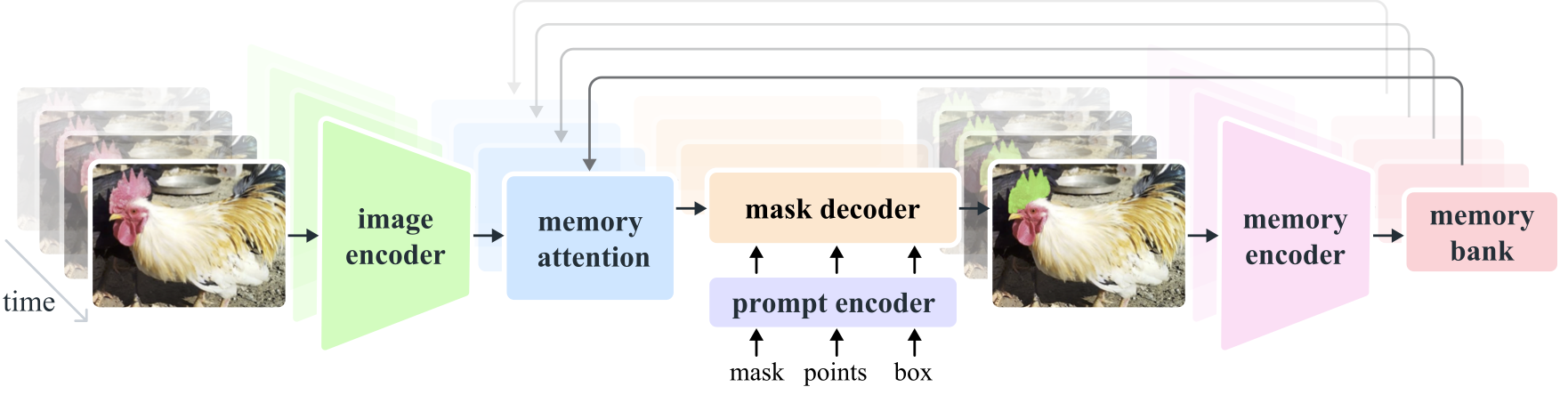 **Segment Anything Model 2 (SAM 2)** is a foundation model towards solving promptable visual segmentation in images and videos. We extend SAM to video by considering images as a video with a single frame. The model design is a simple transformer architecture with streaming memory for real-time video processing. We build a model-in-the-loop data engine, which improves model and data via user interaction, to collect [**our SA-V dataset**](https://ai.meta.com/datasets/segment-anything-video), the largest video segmentation dataset to date. SAM 2 trained on our data provides strong performance across a wide range of tasks and visual domains. # Segment Anything **[Meta AI Research, FAIR](https://ai.facebook.com/research/)** [Alexander Kirillov](https://alexander-kirillov.github.io/), [Eric Mintun](https://ericmintun.github.io/), [Nikhila Ravi](https://nikhilaravi.com/), [Hanzi Mao](https://hanzimao.me/), Chloe Rolland, Laura Gustafson, [Tete Xiao](https://tetexiao.com), [Spencer Whitehead](https://www.spencerwhitehead.com/), Alex Berg, Wan-Yen Lo, [Piotr Dollar](https://pdollar.github.io/), [Ross Girshick](https://www.rossgirshick.info/) [[`Paper`](https://ai.facebook.com/research/publications/segment-anything/)] [[`Project`](https://segment-anything.com/)] [[`Demo`](https://segment-anything.com/demo)] [[`Dataset`](https://segment-anything.com/dataset/index.html)] [[`Blog`](https://ai.facebook.com/blog/segment-anything-foundation-model-image-segmentation/)] [[`BibTeX`](#citing-segment-anything)]  The **Segment Anything Model (SAM)** produces high quality object masks from input prompts such as points or boxes, and it can be used to generate masks for all objects in an image. It has been trained on a [dataset](https://segment-anything.com/dataset/index.html) of 11 million images and 1.1 billion masks, and has strong zero-shot performance on a variety of segmentation tasks. <p float="left"> <img src="assets/masks1.png?raw=true" width="37.25%" /> <img src="assets/masks2.jpg?raw=true" width="61.5%" /> </p> ## Installation The code requires `python>=3.8`, as well as `pytorch>=1.7` and `torchvision>=0.8`. Please follow the instructions [here](https://pytorch.org/get-started/locally/) to install both PyTorch and TorchVision dependencies. Installing both PyTorch and TorchVision with CUDA support is strongly recommended. Install Segment Anything: ``` pip install git+https://github.com/facebookresearch/segment-anything.git ``` or clone the repository locally and install with ``` git clone git@github.com:facebookresearch/segment-anything.git cd segment-anything; pip install -e . ``` The following optional dependencies are necessary for mask post-processing, saving masks in COCO format, the example notebooks, and exporting the model in ONNX format. `jupyter` is also required to run the example notebooks. ``` pip install opencv-python pycocotools matplotlib onnxruntime onnx ``` ## <a name="GettingStarted"></a>Getting Started First download a [model checkpoint](#model-checkpoints). Then the model can be used in just a few lines to get masks from a given prompt: ``` from segment_anything import SamPredictor, sam_model_registry sam = sam_model_registry["<model_type>"](checkpoint="<path/to/checkpoint>") predictor = SamPredictor(sam) predictor.set_image(<your_image>) masks, _, _ = predictor.predict(<input_prompts>) ``` or generate masks for an entire image:
E2README.mdConnects the README quick start, automatic mask generation, ONNX export, and the SamPredictor definition.Lines 46–124
The following optional dependencies are necessary for mask post-processing, saving masks in COCO format, the example notebooks, and exporting the model in ONNX format. `jupyter` is also required to run the example notebooks.

```
pip install opencv-python pycocotools matplotlib onnxruntime onnx
```

## <a name="GettingStarted"></a>Getting Started

First download a [model checkpoint](#model-checkpoints). Then the model can be used in just a few lines to get masks from a given prompt:

```
from segment_anything import SamPredictor, sam_model_registry
sam = sam_model_registry["<model_type>"](checkpoint="<path/to/checkpoint>")
predictor = SamPredictor(sam)
predictor.set_image(<your_image>)
masks, _, _ = predictor.predict(<input_prompts>)
```

or generate masks for an entire image:

```
from segment_anything import SamAutomaticMaskGenerator, sam_model_registry
sam = sam_model_registry["<model_type>"](checkpoint="<path/to/checkpoint>")
mask_generator = SamAutomaticMaskGenerator(sam)
masks = mask_generator.generate(<your_image>)
```

Additionally, masks can be generated for images from the command line:

```
python scripts/amg.py --checkpoint <path/to/checkpoint> --model-type <model_type> --input <image_or_folder> --output <path/to/output>
```

See the examples notebooks on [using SAM with prompts](/notebooks/predictor_example.ipynb) and [automatically generating masks](/notebooks/automatic_mask_generator_example.ipynb) for more details.

<p float="left">
  <img src="assets/notebook1.png?raw=true" width="49.1%" />
  <img src="assets/notebook2.png?raw=true" width="48.9%" />
</p>

## ONNX Export

SAM's lightweight mask decoder can be exported to ONNX format so that it can be run in any environment that supports ONNX runtime, such as in-browser as showcased in the [demo](https://segment-anything.com/demo). Export the model with

```
python scripts/export_onnx_model.py --checkpoint <path/to/checkpoint> --model-type <model_type> --output <path/to/output>
```

See the [example notebook](https://github.com/facebookresearch/segment-anything/blob/main/notebooks/onnx_model_example.ipynb) for details on how to combine image preprocessing via SAM's backbone with mask prediction using the ONNX model. It is recommended to use the latest stable version of PyTorch for ONNX export.

### Web demo

The `demo/` folder has a simple one page React app which shows how to run mask prediction with the exported ONNX model in a web browser with multithreading. Please see [`demo/README.md`](https://github.com/facebookresearch/segment-anything/blob/main/demo/README.md) for more details.

## <a name="Models"></a>Model Checkpoints

Three model versions of the model are available with different backbone sizes. These models can be instantiated by running

```
from segment_anything import sam_model_registry
sam = sam_model_registry["<model_type>"](checkpoint="<path/to/checkpoint>")
```

Click the links below to download the checkpoint for the corresponding model type.

- **`default` or `vit_h`: [ViT-H SAM model.](https://dl.fbaipublicfiles.com/segment_anything/sam_vit_h_4b8939.pth)**
- `vit_l`: [ViT-L SAM model.](https://dl.fbaipublicfiles.com/segment_anything/sam_vit_l_0b3195.pth)
- `vit_b`: [ViT-B SAM model.](https://dl.fbaipublicfiles.com/segment_anything/sam_vit_b_01ec64.pth)

## Dataset

See [here](https://ai.facebook.com/datasets/segment-anything/) for an overview of the datastet. The dataset can be downloaded [here](https://ai.facebook.com/datasets/segment-anything-downloads/). By downloading the datasets you agree that you have read and accepted the terms of the SA-1B Dataset Research License.

We save masks per image as a json file. It can be loaded as a dictionary in python in the below format.

```python
{
"image" : image_info,E3setup.pyRecords package metadata, dependencies, supported Python versions, and runtime constraints.Lines 1–19
# Copyright (c) Meta Platforms, Inc. and affiliates.
# All rights reserved.

# This source code is licensed under the license found in the
# LICENSE file in the root directory of this source tree.

from setuptools import find_packages, setup

setup(
    name="segment_anything",
    version="1.0",
    install_requires=[],
    packages=find_packages(exclude="notebooks"),
    extras_require={
        "all": ["matplotlib", "pycocotools", "opencv-python", "onnx", "onnxruntime"],
        "dev": ["flake8", "isort", "black", "mypy"],
    },
)
E4segment_anything/predictor.pyDefines SamPredictor and the set_image path that prepares reusable image embeddings.Lines 3–51
# This source code is licensed under the license found in the
# LICENSE file in the root directory of this source tree.

import numpy as np
import torch

from segment_anything.modeling import Sam

from typing import Optional, Tuple

from .utils.transforms import ResizeLongestSide


class SamPredictor:
    def __init__(
        self,
        sam_model: Sam,
    ) -> None:
        """
        Uses SAM to calculate the image embedding for an image, and then
        allow repeated, efficient mask prediction given prompts.

        Arguments:
          sam_model (Sam): The model to use for mask prediction.
        """
        super().__init__()
        self.model = sam_model
        self.transform = ResizeLongestSide(sam_model.image_encoder.img_size)
        self.reset_image()

    def set_image(
        self,
        image: np.ndarray,
        image_format: str = "RGB",
    ) -> None:
        """
        Calculates the image embeddings for the provided image, allowing
        masks to be predicted with the 'predict' method.

        Arguments:
          image (np.ndarray): The image for calculating masks. Expects an
            image in HWC uint8 format, with pixel values in [0, 255].
          image_format (str): The color format of the image, in ['RGB', 'BGR'].
        """
        assert image_format in [
            "RGB",
            "BGR",
], f"image_format must be in ['RGB', 'BGR'], is {image_format}."E5segment_anything/predictor.pyDefines prompt inputs, multimask behavior, prediction outputs, and the repeated inference contract.Lines 78–126
        """
        assert (
            len(transformed_image.shape) == 4
            and transformed_image.shape[1] == 3
            and max(*transformed_image.shape[2:]) == self.model.image_encoder.img_size
        ), f"set_torch_image input must be BCHW with long side {self.model.image_encoder.img_size}."
        self.reset_image()

        self.original_size = original_image_size
        self.input_size = tuple(transformed_image.shape[-2:])
        input_image = self.model.preprocess(transformed_image)
        self.features = self.model.image_encoder(input_image)
        self.is_image_set = True

    def predict(
        self,
        point_coords: Optional[np.ndarray] = None,
        point_labels: Optional[np.ndarray] = None,
        box: Optional[np.ndarray] = None,
        mask_input: Optional[np.ndarray] = None,
        multimask_output: bool = True,
        return_logits: bool = False,
    ) -> Tuple[np.ndarray, np.ndarray, np.ndarray]:
        """
        Predict masks for the given input prompts, using the currently set image.

        Arguments:
          point_coords (np.ndarray or None): A Nx2 array of point prompts to the
            model. Each point is in (X,Y) in pixels.
          point_labels (np.ndarray or None): A length N array of labels for the
            point prompts. 1 indicates a foreground point and 0 indicates a
            background point.
          box (np.ndarray or None): A length 4 array given a box prompt to the
            model, in XYXY format.
          mask_input (np.ndarray): A low resolution mask input to the model, typically
            coming from a previous prediction iteration. Has form 1xHxW, where
            for SAM, H=W=256.
          multimask_output (bool): If true, the model will return three masks.
            For ambiguous input prompts (such as a single click), this will often
            produce better masks than a single prediction. If only a single
            mask is needed, the model's predicted quality score can be used
            to select the best mask. For non-ambiguous prompts, such as multiple
            input prompts, multimask_output=False can give better results.
          return_logits (bool): If true, returns un-thresholded masks logits
            instead of a binary mask.

        Returns:
          (np.ndarray): The output masks in CxHxW format, where C is the
number of masks, and (H, W) is the original image size.E6segment_anything/utils/transforms.pyDefines image, coordinate, and box transforms through the ResizeLongestSide preprocessing contract.Lines 2–50
# All rights reserved.

# This source code is licensed under the license found in the
# LICENSE file in the root directory of this source tree.

import numpy as np
import torch
from torch.nn import functional as F
from torchvision.transforms.functional import resize, to_pil_image  # type: ignore

from copy import deepcopy
from typing import Tuple


class ResizeLongestSide:
    """
    Resizes images to the longest side 'target_length', as well as provides
    methods for resizing coordinates and boxes. Provides methods for
    transforming both numpy array and batched torch tensors.
    """

    def __init__(self, target_length: int) -> None:
        self.target_length = target_length

    def apply_image(self, image: np.ndarray) -> np.ndarray:
        """
        Expects a numpy array with shape HxWxC in uint8 format.
        """
        target_size = self.get_preprocess_shape(image.shape[0], image.shape[1], self.target_length)
        return np.array(resize(to_pil_image(image), target_size))

    def apply_coords(self, coords: np.ndarray, original_size: Tuple[int, ...]) -> np.ndarray:
        """
        Expects a numpy array of length 2 in the final dimension. Requires the
        original image size in (H, W) format.
        """
        old_h, old_w = original_size
        new_h, new_w = self.get_preprocess_shape(
            original_size[0], original_size[1], self.target_length
        )
        coords = deepcopy(coords).astype(float)
        coords[..., 0] = coords[..., 0] * (new_w / old_w)
        coords[..., 1] = coords[..., 1] * (new_h / old_h)
        return coords

    def apply_boxes(self, boxes: np.ndarray, original_size: Tuple[int, ...]) -> np.ndarray:
        """
        Expects a numpy array shape Bx4. Requires the original image size
in (H, W) format.E7segment_anything/modeling/transformer.pyExposes the transformer forward path and the tensor-level model boundary used during mask prediction.Lines 48–96
                    embedding_dim=embedding_dim,
                    num_heads=num_heads,
                    mlp_dim=mlp_dim,
                    activation=activation,
                    attention_downsample_rate=attention_downsample_rate,
                    skip_first_layer_pe=(i == 0),
                )
            )

        self.final_attn_token_to_image = Attention(
            embedding_dim, num_heads, downsample_rate=attention_downsample_rate
        )
        self.norm_final_attn = nn.LayerNorm(embedding_dim)

    def forward(
        self,
        image_embedding: Tensor,
        image_pe: Tensor,
        point_embedding: Tensor,
    ) -> Tuple[Tensor, Tensor]:
        """
        Args:
          image_embedding (torch.Tensor): image to attend to. Should be shape
            B x embedding_dim x h x w for any h and w.
          image_pe (torch.Tensor): the positional encoding to add to the image. Must
            have the same shape as image_embedding.
          point_embedding (torch.Tensor): the embedding to add to the query points.
            Must have shape B x N_points x embedding_dim for any N_points.

        Returns:
          torch.Tensor: the processed point_embedding
          torch.Tensor: the processed image_embedding
        """
        # BxCxHxW -> BxHWxC == B x N_image_tokens x C
        bs, c, h, w = image_embedding.shape
        image_embedding = image_embedding.flatten(2).permute(0, 2, 1)
        image_pe = image_pe.flatten(2).permute(0, 2, 1)

        # Prepare queries
        queries = point_embedding
        keys = image_embedding

        # Apply transformer blocks and final layernorm
        for layer in self.layers:
            queries, keys = layer(
                queries=queries,
                keys=keys,
                query_pe=point_embedding,
key_pe=image_pe,E8notebooks/onnx_model_example.ipynbDemonstrates ONNX inputs, prompt-label semantics, padding behavior, and concrete inference output handling.Lines 170–218
# %% [markdown 25]
## Using an ONNX model

# %% [markdown 26]
Here as an example, we use `onnxruntime` in python on CPU to execute the ONNX model. However, any platform that supports an ONNX runtime could be used in principle. Launch the runtime session below:

# %% [code 27]
ort_session = onnxruntime.InferenceSession(onnx_model_path)

# %% [markdown 28]
To use the ONNX model, the image must first be pre-processed using the SAM image encoder. This is a heavier weight process best performed on GPU. SamPredictor can be used as normal, then `.get_image_embedding()` will retreive the intermediate features.

# %% [code 29]
sam.to(device='cuda')
predictor = SamPredictor(sam)

# %% [code 30]
predictor.set_image(image)

# %% [code 31]
image_embedding = predictor.get_image_embedding().cpu().numpy()

# %% [code 32]
image_embedding.shape

# %% [markdown 33]
The ONNX model has a different input signature than `SamPredictor.predict`. The following inputs must all be supplied. Note the special cases for both point and mask inputs. All inputs are `np.float32`.
* `image_embeddings`: The image embedding from `predictor.get_image_embedding()`. Has a batch index of length 1.
* `point_coords`: Coordinates of sparse input prompts, corresponding to both point inputs and box inputs. Boxes are encoded using two points, one for the top-left corner and one for the bottom-right corner. *Coordinates must already be transformed to long-side 1024.* Has a batch index of length 1.
* `point_labels`: Labels for the sparse input prompts. 0 is a negative input point, 1 is a positive input point, 2 is a top-left box corner, 3 is a bottom-right box corner, and -1 is a padding point. *If there is no box input, a single padding point with label -1 and coordinates (0.0, 0.0) should be concatenated.*
* `mask_input`: A mask input to the model with shape 1x1x256x256. This must be supplied even if there is no mask input. In this case, it can just be zeros.
* `has_mask_input`: An indicator for the mask input. 1 indicates a mask input, 0 indicates no mask input.
* `orig_im_size`: The size of the input image in (H,W) format, before any transformation.

Additionally, the ONNX model does not threshold the output mask logits. To obtain a binary mask, threshold at `sam.mask_threshold` (equal to 0.0).

# %% [markdown 34]
### Example point input

# %% [code 35]
input_point = np.array([[500, 375]])
input_label = np.array([1])

# %% [markdown 36]
Add a batch index, concatenate a padding point, and transform.

# %% [code 37]
onnx_coord = np.concatenate([input_point, np.array([[0.0, 0.0]])], axis=0)[None, :, :]
onnx_label = np.concatenate([input_label, np.array([-1])], axis=0)[None, :].astype(np.float32)
E9demo/README.mdDocuments the React and WebAssembly browser demonstration and its model-preparation workflow.Lines 1–65
## Segment Anything Simple Web demo

This **front-end only** React based web demo shows how to load a fixed image and corresponding `.npy` file of the SAM image embedding, and run the SAM ONNX model in the browser using Web Assembly with mulithreading enabled by `SharedArrayBuffer`, Web Worker, and SIMD128.

<img src="https://github.com/facebookresearch/segment-anything/raw/main/assets/minidemo.gif" width="500"/>

## Run the app

Install Yarn

```
npm install --g yarn
```

Build and run:

```
yarn && yarn start
```

Navigate to [`http://localhost:8081/`](http://localhost:8081/)

Move your cursor around to see the mask prediction update in real time.

## Export the image embedding

In the [ONNX Model Example notebook](https://github.com/facebookresearch/segment-anything/blob/main/notebooks/onnx_model_example.ipynb) upload the image of your choice and generate and save corresponding embedding.

Initialize the predictor:

```python
checkpoint = "sam_vit_h_4b8939.pth"
model_type = "vit_h"
sam = sam_model_registry[model_type](checkpoint=checkpoint)
sam.to(device='cuda')
predictor = SamPredictor(sam)
```

Set the new image and export the embedding:

```
image = cv2.imread('src/assets/dogs.jpg')
predictor.set_image(image)
image_embedding = predictor.get_image_embedding().cpu().numpy()
np.save("dogs_embedding.npy", image_embedding)
```

Save the new image and embedding in `src/assets/data`.

## Export the ONNX model

You also need to export the quantized ONNX model from the [ONNX Model Example notebook](https://github.com/facebookresearch/segment-anything/blob/main/notebooks/onnx_model_example.ipynb).

Run the cell in the notebook which saves the `sam_onnx_quantized_example.onnx` file, download it and copy it to the path `/model/sam_onnx_quantized_example.onnx`.

Here is a snippet of the export/quantization code:

```
onnx_model_path = "sam_onnx_example.onnx"
onnx_model_quantized_path = "sam_onnx_quantized_example.onnx"
quantize_dynamic(
    model_input=onnx_model_path,
    model_output=onnx_model_quantized_path,
    optimize_model=True,
per_channel=False,E10scripts/export_onnx_model.pyDefines the ONNX export entry point, supported flags, and reproducible deployment options.Lines 49–97
)

parser.add_argument(
    "--opset",
    type=int,
    default=17,
    help="The ONNX opset version to use. Must be >=11",
)

parser.add_argument(
    "--quantize-out",
    type=str,
    default=None,
    help=(
        "If set, will quantize the model and save it with this name. "
        "Quantization is performed with quantize_dynamic from onnxruntime.quantization.quantize."
    ),
)

parser.add_argument(
    "--gelu-approximate",
    action="store_true",
    help=(
        "Replace GELU operations with approximations using tanh. Useful "
        "for some runtimes that have slow or unimplemented erf ops, used in GELU."
    ),
)

parser.add_argument(
    "--use-stability-score",
    action="store_true",
    help=(
        "Replaces the model's predicted mask quality score with the stability "
        "score calculated on the low resolution masks using an offset of 1.0. "
    ),
)

parser.add_argument(
    "--return-extra-metrics",
    action="store_true",
    help=(
        "The model will return five results: (masks, scores, stability_scores, "
        "areas, low_res_logits) instead of the usual three. This can be "
        "significantly slower for high resolution outputs."
    ),
)


def run_export(
RESEARCH PATH
Turn reading into verifiable research tasks
0%
0/4 stages complete · stored on this device only
Establish the project boundary
Read installation, model variants, checkpoints, and the three public usage paths before entering the implementation.
Research taskRecord the required environment, model choice, checkpoint, prompt type, and expected output.
Completion criterion
Define the smallest evidence-backed reproduction scope.
REPRODUCTION LAB
Conditions incompleteReproduction means preserving evidence, not merely running code
The current evidence provides five verbatim reproduction commands. This is a plan awaiting execution, not a claim that reproduction has succeeded; environment, checkpoints, hardware, and outputs still require verification.
Install Segment Anything
Install the repository package using the command documented in the README.
pip install git+https://github.com/facebookresearch/segment-anything.gitInstall optional dependencies
Prepare mask post-processing, notebooks, COCO export, and ONNX workflows; Jupyter remains an additional notebook prerequisite.
pip install opencv-python pycocotools matplotlib onnxruntime onnxGenerate automatic masks
Run the repository's automatic-mask command after replacing every explicit placeholder.
python scripts/amg.py --checkpoint <path/to/checkpoint> --model-type <model_type> --input <image_or_folder> --output <path/to/output>Export the ONNX model
Export the lightweight mask decoder using the repository-documented entry point.
python scripts/export_onnx_model.py --checkpoint <path/to/checkpoint> --model-type <model_type> --output <path/to/output>Install the demo package manager
Prepare the browser demo using the exact dependency command from its documentation.
npm install --g yarnUNDERSTANDING CHECK
Make research judgments answerable to evidence
Use repository-specific questions to test whether you understand the mechanism and reproduction conditions instead of merely browsing files.
0/3correct now
Q1
In SamPredictor.predict, what does point label 1 represent?
Q2
What training-data scale is stated in the repository README?
Q3